
Screenshots


Introduction
The Use of English AI app, developed by Shining Apps LLC, is a cutting-edge educational tool designed to enhance your English language skills, particularly in preparation for Cambridge English exams. Currently at version 2.1.22, this app leverages advanced Natural Language Processing (NLP) to generate unique and diverse exercises based on an extensive database of over 2000 official Cambridge English exams. The app aims to provide users with a tailored learning experience by offering a range of exercises that cover various parts of the Cambridge English exams, including Reading, Grammar Tests, and more. With support for multiple proficiency levels (B1 PET, B2 FCE, C1 CAE, and C2 CPE), this app is suitable for learners at different stages of their English learning journey.
Graphics & Gameplay
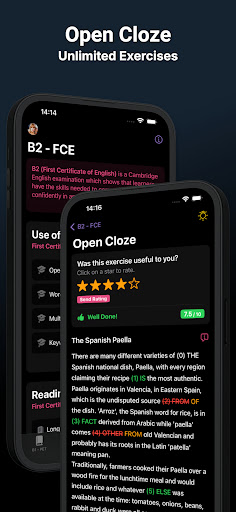
The visuals of the Use of English AI app are modern and user-friendly. The screenshots showcase a clean interface that is easy to navigate, with intuitive icons and well-organized menus. The main exercise page displays clearly defined sections for each type of exercise, making it straightforward for users to select what they wish to practice. The app's color scheme is pleasant, utilizing soft tones that are easy on the eyes, ideal for extended study sessions.
Each exercise is presented with a minimalist design that focuses on user engagement. The text is legible, and the layout is structured in a way that encourages interaction. Additionally, the app features interactive elements, such as exercise ratings and feedback options, which enhance the learning experience by allowing users to reflect on their performance.
Key Features
- Diverse Exercise Types: The app includes a variety of exercise formats such as Open Cloze, Multiple Choice, Word Formation, Keyword Transformation, and more, ensuring comprehensive preparation for Cambridge exams.
- AI-Generated Content: Using advanced algorithms, the app generates unique exercises tailored to the user's learning needs. This feature ensures that users are constantly challenged with fresh content.
- Rating System: Users can rate exercises after completion, helping the AI to refine its future outputs based on user feedback.
- Flexible Practice: Users can generate three AI exercises every five minutes, allowing for ample practice opportunities without overwhelming the learner.
- Multi-Level Support: The app caters to various proficiency levels, from B1 to C2, making it suitable for learners at different stages.
- Progress Tracking: Users can track their performance over time, helping them identify areas for improvement and measure their learning progress.
Mod Features
- Premium Unlocked: Enjoy all premium features without having to pay for a subscription, allowing unrestricted access to advanced exercises and resources.
- No Ads: Experience an uninterrupted learning environment with an ad-free interface, allowing users to focus solely on their studies.
- Unlimited Money: In a hypothetical mod version, users could have unlimited resources to access exclusive features, premium exercises, and advanced analytics.
- Advanced Feedback: Receive detailed insights and personalized study plans based on performance and learning patterns, enhancing the learning experience.
How to Install APK on Android
Installing the Use of English AI APK on your Android device is a straightforward process. Follow these steps to get started:
- Enable Unknown Sources: Go to your device's Settings. Navigate to Security and enable 'Install from Unknown Sources' to allow installations from sources other than the Google Play Store.
- Download the APK: Visit the official download link at apkgk.com to download the latest APK version of Use of English AI.
- Locate the APK: Open your device's file manager and navigate to the Downloads folder (or wherever the APK was saved).
- Install the APK: Tap on the Use of English AI APK file to start the installation process. Follow the on-screen prompts to complete the installation.
- Launch the App: Once installed, locate the app icon on your home screen or app drawer and tap to launch.
Call to Action
If you're serious about improving your English skills and acing the Cambridge English exams, download Use of English AI today! Click the link below to get started on your journey to English proficiency: