Screenshots


Introduction
Splitter is an innovative mobile application designed to simplify the process of calculating and sharing fuel costs for trips and everyday rides. Developed by Sree Harinandan, this app eliminates the need for cumbersome manual calculations or guesswork by leveraging a straightforward formula based on essential variables such as distance, vehicle mileage, fuel price, and the number of passengers. In just seconds, users can obtain a precise per-person cost, making it an invaluable tool for road trips, carpools, and daily commuting scenarios where cost-sharing is required. Notably, Splitter operates without any accounts or advertisements, ensuring a seamless user experience.
Graphics & Gameplay
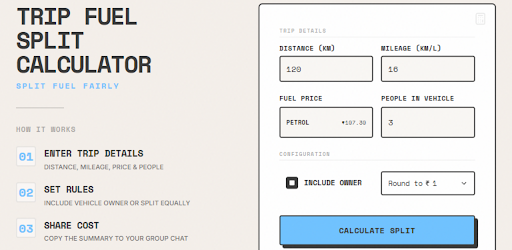
The visuals of Splitter are sleek and user-friendly, designed to facilitate quick and efficient interactions. The app features a clean interface with a modern aesthetic, showcasing a well-organized layout that minimizes clutter and maximizes usability. The main screen presents users with input fields for distance, mileage, fuel price, and number of passengers, all prominently displayed for easy access. The app's color scheme is calming and professional, with contrasting colors that enhance readability.
One standout feature is the automatic detection of local fuel prices, which is visually represented through intuitive icons and prompts. The sharing feature, which integrates seamlessly with WhatsApp, is also visually appealing, allowing users to send cost breakdowns effortlessly. Overall, Splitter's graphics are not only attractive but also functional, guiding users through their calculations with minimal friction.
Key Features
- Fuel Cost Calculation: Easily calculate fuel expenses based on distance traveled, vehicle mileage, and the price of fuel.
- Automatic Fuel Price Detection: The app automatically detects nearby fuel prices based on the user's location, ensuring accurate calculations.
- Support for Petrol and Diesel: Users can choose between petrol and diesel options, catering to a wide range of vehicles.
- Manual Fuel Price Override: In cases where automatic detection fails, users can manually input fuel prices for precise calculations.
- Fair Per-Person Cost Splitting: The app provides options for fair cost distribution among passengers, with rounding features for simpler amounts.
- WhatsApp Sharing: Instantly share calculated costs with friends or family via WhatsApp for quick settlements and transparency.
- No Accounts Required: Users can access all features without the need to create an account, enhancing privacy and convenience.
- No Ads: Enjoy an uninterrupted experience without advertisements cluttering your interface.
Mod Features
While Splitter offers a robust set of features in its standard version, users may also find appealing mod features that enhance the overall experience:
- Premium Unlocked: Gain access to advanced features such as comprehensive trip planning and historical cost tracking.
- No Ads: Enjoy an ad-free experience, allowing you to focus solely on your calculations without distractions.
- Unlimited Money: Use an unlimited budget feature that allows for customized scenarios, helpful for budgeting for larger trips or events.
- Enhanced Location Services: Improved GPS tracking for more accurate fuel price detection, even in remote areas.
- Custom Themes: Personalize the app’s appearance with a variety of themes and color palettes for a more personalized user experience.
How to Install APK on Android
Installing the Splitter APK on your Android device is a straightforward process. Follow these steps to get started:
- Enable Unknown Sources: Go to your device’s Settings, then navigate to Security. Enable the option to allow installations from unknown sources.
- Download the APK: Visit the official URL here to download the Splitter APK file directly to your device.
- Open the APK File: Locate the downloaded APK file in your device’s file manager and tap on it to begin the installation process.
- Follow Installation Prompts: Follow the on-screen instructions to complete the installation. Once installed, you can find Splitter in your app drawer.
- Launch the App: Open Splitter and start using it to calculate and share your fuel costs effortlessly!
Conclusion
In a world where sharing costs for travel is increasingly common, Splitter stands out as a practical and user-friendly solution. Its ability to compute fuel expenses quickly and accurately, combined with features like automatic price detection and WhatsApp sharing, makes it an essential tool for anyone who frequently travels with others. Whether you're planning a road trip with friends or simply commuting with colleagues, Splitter ensures that everyone knows exactly where they stand when it comes to costs. Don't miss out on this handy application—download Splitter today and take the hassle out of fuel cost calculations!
Ready to simplify your fuel cost calculations? Download Splitter now from this link!