
Screenshots


Introduction
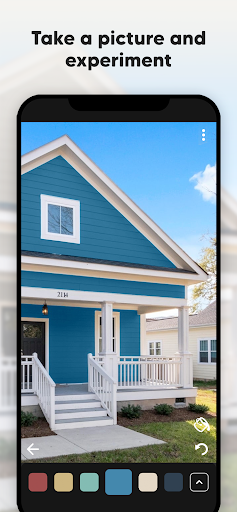
Paint my House: Exterior Color is an innovative application developed by Try the Colors s.r.o., designed specifically for homeowners, DIY enthusiasts, and professional renovators looking to visualize how different paint colors will transform the exterior of their houses and buildings. With the app's intuitive interface and extensive color palette, users can easily take a photo of their property, select from a vast array of colors, and apply them virtually to their walls with just a single tap. Whether you own a quaint cottage, a modern home, or a luxurious villa, this app provides an ideal platform to experiment with exterior color schemes before making a final decision.
Graphics & Gameplay
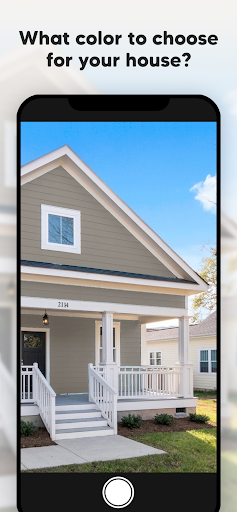
The graphics of Paint my House are sleek and user-friendly, making it accessible for users of all ages and skill levels. The app features a clean, modern interface that allows for easy navigation. From the screenshots, we can see a variety of visual elements, including:
- Realistic Color Application: The app allows users to see how different colors will look when applied to their home, with realistic textures and shades that mimic actual paint.
- Wide Color Palette: Users can scroll through an extensive range of colors, with options that cater to every taste, from earthy tones to vibrant hues.
- Before and After Visualization: The app provides a before-and-after view, allowing users to compare the original exterior with the newly painted version, aiding in decision-making.
- Detailed Settings: Users can adjust the dimensions and angles of their house in the app to ensure accurate visual representation.
Overall, the graphics are impressive, making the design process enjoyable and engaging, which is crucial for those looking to undertake a home makeover.
Key Features
- Wall Color Changer: Users can easily change the exterior wall color of their house with a diverse selection of hues.
- Building Compatibility: Whether you have a small cottage or a large industrial building, the app caters to all dimensions and types of structures.
- House Simulator: The built-in simulator allows users to virtually paint their house, giving them a realistic preview of how their chosen colors will look.
- Visualization Tools: These tools enable users to visualize how different colors will harmonize with their garden and surrounding environment.
- Unlimited Color Palette: The premium version offers an endless array of color combinations, ensuring that users can find the perfect match for their design vision.
- Compatibility with Major Paint Brands: The app works seamlessly with popular paint producers such as Dulux, Behr, Sherwin-Williams, and Nippon, allowing users to choose brand-specific colors.
Mod Features
For users looking to enhance their experience with Paint my House, several mod features may be available that could transform how you use the app:
- Premium Unlocked: Access all premium features without having to make in-app purchases, including the unlimited color palette and advanced visualization tools.
- No Ads: Enjoy an uninterrupted experience while using the app, making it easier and more enjoyable to experiment with colors.
- Unlimited Money: Gain unlimited resources within the app to access exclusive features, tools, and color options without restrictions.
These mod features can significantly enhance the usability and enjoyment of the app, providing a more comprehensive design tool for users.
How to Install APK on Android
Installing the Paint my House: Exterior Color APK on your Android device is straightforward. Follow these steps to get started:
- Enable Unknown Sources: Go to your device’s settings, navigate to Security, and enable the option to install apps from unknown sources.
- Download the APK: Visit the official URL provided (https://apkgk.com/com.trythecolors.paintmyhouse) to download the latest version of the Paint my House APK file.
- Open the APK File: Locate the downloaded APK file in your file manager and tap on it to begin the installation process.
- Install the App: Follow the on-screen instructions to complete the installation. Once installed, you can find the app icon in your app drawer.
- Launch the App: Open Paint my House and start experimenting with colors for your home’s exterior!
Call To Action
Ready to give your house a makeover? Download Paint my House: Exterior Color today and explore a world of color possibilities for your home. Click the link below to start your journey towards a beautifully painted exterior!